
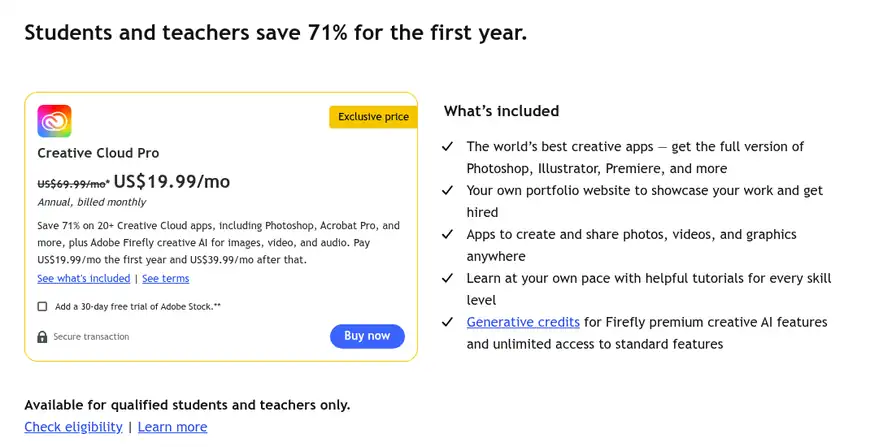
The Adobe Premiere Pro student discount is the cheapest legal way to get Premiere, but it works differently from what most people expect. Adobe doesn’t sell Premiere on its own at a student price. Instead, verified students and teachers get Creative Cloud Pro, which includes Premiere and 20+ other apps, for US$19.99 a month in the first year. That’s 71% off the regular US$69.99, and it’s actually cheaper than buying Premiere alone at US$22.99 a month. Below are the five real offers, the full price table, who qualifies, and how to sign up step by step.
I checked every price on this page against Adobe’s US plans pages, its student offer terms, and its help center on 12 October 2026. There’s no public Premiere Pro coupon code on Adobe’s site, so every card below is an official Adobe price, not a code. Adobe now lists the app simply as Premiere on its plans page.
Content Outline
Creative Cloud Pro for students: $19.99/mo first year, save 71%
Premiere plus 20+ apps and 4,000 monthly generative credits for verified students and teachers, on an annual plan billed monthly, then $39.99/mo from year two.
This is the deal I’d take as a student: a full year of Premiere, Photoshop, After Effects and Audition costs US$239.88, which is less than a year of Premiere alone.
Premiere single app: $22.99/mo on the annual plan
Premiere on desktop and iPhone with 100GB of cloud storage, Frame.io review tools and Adobe Express Premium, for anyone who only edits video.
If you aren’t eligible for education pricing and only need video editing, the single app is the cheapest paid route.
Creative Cloud Pro: $34.99/mo for 3 months, save 50%
New non-student subscribers get Premiere plus 20+ apps at half price for the first 3 months of a 12-month plan, then $69.99/mo.
This launch offer is for regular individual buyers; Adobe’s terms say it can’t be used by education customers.
Free 7-day trial of Premiere or Creative Cloud Pro
Use the full desktop version of Premiere for a week before you pay; the trial turns into a paid plan after 7 days unless you cancel first.
Students can start the trial straight from the Students and teachers tab, so the student price kicks in when it ends.
Premiere on mobile: free standalone app
Adobe offers Premiere on mobile as a free video editing app, handy for quick phone edits before you commit to a desktop plan.
The free mobile app won’t replace the desktop editor for class projects, but it costs nothing to try.
Adobe Premiere Pro Student Discount 2026: Prices Compared
Here’s what each way of getting Premiere costs in the US. Every plan below is an annual plan billed monthly unless noted, which means you agree to 12 months even though you pay each month.
| Plan | Price | After the intro period | What you get |
|---|---|---|---|
| Creative Cloud Pro for students and teachers | $19.99/mo for the first year ($239.88 if prepaid) | $39.99/mo ($479.88/yr prepaid) while you stay eligible | Premiere plus 20+ apps, 4,000 monthly generative credits, portfolio site, tutorials |
| Premiere (single app, individuals) | $22.99/mo | $22.99/mo | Premiere on desktop and iPhone, 100GB cloud storage, 25 monthly generative credits, Frame.io, Adobe Express Premium |
| Creative Cloud Pro (individuals, new subscribers) | $34.99/mo for the first 3 months | $69.99/mo | Premiere plus 20+ apps, 100GB cloud storage, 4,000 monthly generative credits |
| Premiere for teams | $37.99/mo per license | $37.99/mo per license | Business licensing and admin tools |
| Creative Cloud Pro for teams | $99.99/mo per license, excl. tax | $99.99/mo per license | All apps for business teams |
Prices checked on 12 October 2026 on Adobe’s US Premiere plans page, Creative Cloud plans page and student offer terms. Prices outside the US differ, and local taxes are added at checkout.
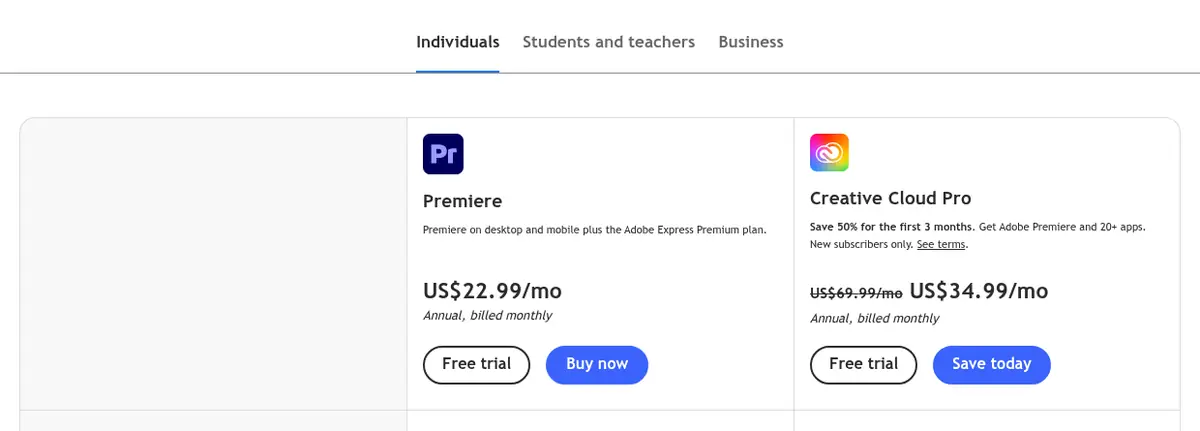
The math is simple. In year one the student plan costs US$239.88, Premiere alone costs US$275.88, and regular Creative Cloud Pro costs US$734.88 with the 3-month offer. From year two the student plan rises to US$39.99 a month, so if you only ever use Premiere, switching to the single app at US$22.99 becomes the cheaper choice.
Who Qualifies for the Adobe Premiere Pro Student Discount
Adobe’s eligibility rules are broader than many people think. According to Adobe’s student page, you qualify if you are:
- A student aged 13 or older currently enrolled at a primary or secondary school (including homeschool programs), a degree or professional college, a university, a post-secondary institution, or a qualified online course or program.
- A teacher or staff member currently employed at one of those institutions, including K-12 schools and homeschool programs.
- Paying with a credit card held by someone 18 or older. A younger student needs a parent or guardian to make the purchase.
The intro price is for first-time memberships only and is limited to one Creative Cloud annual membership per person, bought directly from Adobe. It can’t be combined with any other Adobe discount, so you can’t stack it with the 50% individual offer.
How to Get the Adobe Premiere Pro Student Discount in 5 Steps
- Open Adobe’s Premiere plans page and click the Students and teachers tab.
- Choose Creative Cloud Pro and click Buy now, or Free trial if you want to test it for 7 days first.
- Sign in or create an Adobe account. Use your school-issued email address if you have one, because it’s the fastest way to verify.
- Enter your payment details and confirm the annual plan. The card must belong to someone aged 18 or older.
- Verify your status. If your school email isn’t recognised, Adobe may ask for a document from the current academic year: students can upload a student ID, class schedule, transcript or enrollment letter, and teachers can use a teacher ID, pay slip or offer letter.
Once you’re verified, you pay US$19.99 a month for the first 12 months. After that the plan renews at US$39.99 a month for as long as you stay eligible, unless you change or cancel it.
What You Get With Premiere on the Student Plan
Because the student deal is Creative Cloud Pro, you get far more than Premiere. For a film, media or design student, these are the parts that matter:
- The full desktop version of Premiere on Mac and Windows, with every update included at no extra cost.
- After Effects and Audition for motion graphics and audio cleanup, which most video courses expect you to use alongside Premiere.
- Photoshop, Illustrator, Lightroom and Acrobat Pro for thumbnails, titles, photo work and assignments.
- 4,000 monthly generative credits for Adobe Firefly’s premium AI video and audio features, against 25 on the Premiere single app.
- Two computers: you can install the apps on more than one computer and sign in on up to two, but use them on only one at a time.
- Extras: Adobe Fonts, Adobe Portfolio for a personal website, Behance, and a student discount on Adobe Certified Professional exams.
In my experience, the jump from Premiere alone to the full suite is what makes this deal worth it. Most video projects end up needing a title graphic, a cleaned-up audio track, or a quick motion effect, and on the student plan those tools are already there.
Ways to Pay Less for Premiere Pro
- Take the student price if you qualify: at US$19.99 a month it beats every other way to get Premiere in year one.
- Prepay the year: students can pay US$239.88 upfront instead of monthly. It costs the same in total, but you aren’t billed every month.
- Review the plan before year two: when the student price rises to US$39.99, switch to the Premiere single app at US$22.99 if you no longer use the other apps.
- Use the 7-day trial first: make sure your computer runs Premiere smoothly before you commit to 12 months.
- Know the refund window: Adobe gives a full refund on most plans if you cancel within 14 days of your first purchase.
- Ask your school: some schools and universities license Creative Cloud for students, which can make your own subscription unnecessary.
If you mainly need photo tools, our guide to the Adobe Lightroom student discount covers that side of the education offer, and our Adobe Creative Cloud discount page explains the non-student deals. Still deciding on an editor? Read our FilmoraPro vs Adobe Premiere Pro comparison, or check the current Wondershare Filmora coupons if you want a simpler, cheaper video editor.
Adobe Premiere Pro Student Discount FAQs
No. On Adobe's US plans page, the student and teacher price only applies to Creative Cloud Pro, which includes Premiere. It costs US$19.99 a month in the first year, which is less than the US$22.99 single-app price.
From the second year the Creative Cloud Pro student plan costs US$39.99 a month on the annual plan, or US$479.88 a year if prepaid, as long as you stay eligible. The regular price is US$69.99 a month.
Students aged 13 and older at an accredited school, college, university, homeschool program or qualified online course, plus teachers and staff at those institutions. The card used to pay must belong to someone aged 18 or older.
Adobe doesn't publish a public Premiere coupon code. On 12 October 2026 the real savings were the 71% student price, 50% off Creative Cloud Pro for 3 months for new individual subscribers, and the 7-day free trial. Adobe's student terms say the offer can't be combined with other discounts.
Yes, if you act quickly. Adobe gives a full refund on most plans if you cancel within 14 days of your initial purchase.
Not on desktop. Students get a 7-day free trial of Creative Cloud Pro, then pay US$19.99 a month in the first year. Adobe does offer Premiere on mobile as a free standalone app.
Final Word on the Adobe Premiere Pro Student Discount
Ignore any site promising a secret Premiere Pro code; Adobe’s own site doesn’t list one. The real Adobe Premiere Pro student discount is Creative Cloud Pro at US$19.99 a month for the first year, which gives you Premiere and the rest of Adobe’s apps for less than Premiere costs alone. Verify with your school email, try it free for 7 days, and set a reminder before year two so you can decide whether the US$39.99 renewal or the US$22.99 single app suits you better.
