
Wondershare Filmora coupons save you up to 40% in 2026 if you are a student or teacher, and everyone else can get Filmora from $49.99 a year on Windows, or start on the free version that exports with a watermark. Filmora does not publish a public promo code right now, so the real savings are the education prices, the annual and perpetual plans, and an extra 10% that Wondershare offers when you add a free Creative Assets trial at checkout.
We checked every price on this page against Wondershare’s own US store pages for Windows and Mac on 16 October 2026. Below are the five Filmora deals worth taking, the full price tables for both platforms, how to claim each discount, and the refund rules you should read before you pay.

Filmora Advanced annual: $59.99/yr, about $5 a month
1,000 AI credits every month, 10 GB cloud storage, watermark-free 4K export and every new version. Windows price, billed yearly; Mac is $79.99 a year.
Advanced is the plan I would pick for most people, because it costs only $10 a year more than Basic and adds the monthly AI credits that Filmora’s newer features run on.
Filmora Basic annual: $49.99/yr, about $4.17 a month
The cheapest paid plan: watermark-free 4K export, 1 GB cloud storage and continuous version upgrades, but no monthly AI credits. Mac is $69.99 a year.
Basic suits you if you mainly cut, trim and caption videos and do not care about AI tools.
Filmora perpetual license: $79.99 one-time payment
Pay once and keep Filmora 16 with all of its updates, plus 1,000 AI credits that never expire. Future major versions are not included. Mac is $99.99.
The perpetual license costs the same as about 16 months of Advanced, as long as you are happy to stay on Filmora 16.
Filmora Premium annual: $99.99/yr, about $8.33 a month
Everything in Advanced plus 2,000 AI credits a month, 100 GB cloud storage and the full Creative Assets library. Windows price; Mac is $119.99 a year.
Premium is the bundle Wondershare labels Best Value, and it is the one to take if you rely on stock music, templates and effects.
Filmora education discount: up to 40% off for students
Verified students and teachers pay $49.99 instead of $79.99 for a Windows perpetual license, or $59.99 instead of $99.99 on Mac. Annual plans start at $39.99.
Wondershare Filmora Coupons 2026: Full Price List
Prices checked on 16 October 2026 on filmora.wondershare.com, in US dollars. Filmora licenses are platform-specific: a Windows license only works on Windows and a Mac license only works on Mac, and the Mac plans cost more. Taxes, where they apply, are added at checkout.
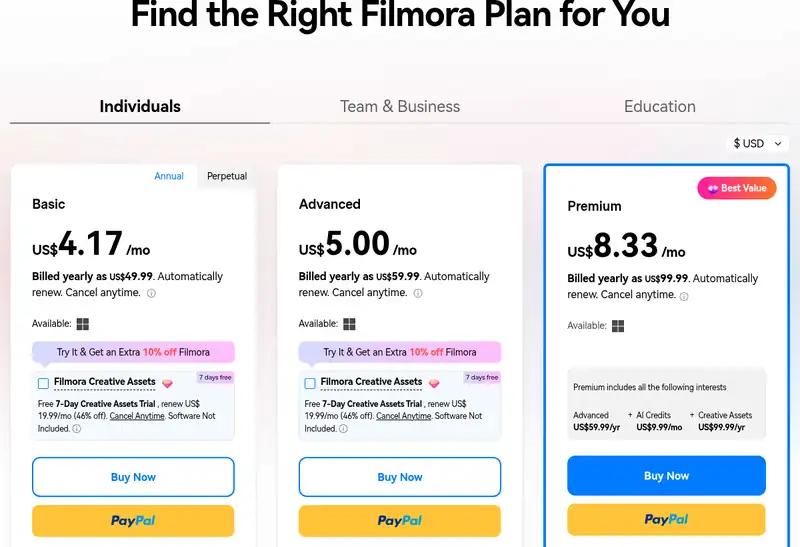
Filmora individual plans (Windows and Mac)
| Plan | Windows | Mac | AI credits | Cloud storage | Updates |
|---|---|---|---|---|---|
| Free | $0 | $0 | None | None | Watermark on exports |
| Basic | $49.99/yr ($4.17/mo) | $69.99/yr ($5.83/mo) | None | 1 GB | All future versions |
| Advanced | $59.99/yr ($5.00/mo) | $79.99/yr ($6.67/mo) | 1,000 a month | 10 GB | All future versions |
| Perpetual | $79.99 once | $99.99 once | 1,000 one-time | 1 GB | Filmora 16 updates only |
| Premium | $99.99/yr ($8.33/mo) | $119.99/yr ($10.00/mo) | 2,000 a month | 100 GB | All future versions |
Every paid plan removes the watermark and unlocks 4K export, 100+ advanced editing features and 500 AI Mate conversations a month. Premium is the only individual plan that includes the Creative Assets library; Wondershare prices that library at $99.99 a year on its own, and the extra AI credits at $9.99 a month.
Filmora education plans (students and teachers)
| Education plan | Windows | Mac |
|---|---|---|
| Monthly | $19.99/mo (was $29.99) | $21.99/mo (was $27.99) |
| Annual | $39.99/yr (was $49.99) | $55.99/yr (was $69.99) |
| Perpetual | $49.99 once (was $79.99) | $59.99 once (was $99.99) |
Wondershare notes that the education perpetual plan does not include AI credit benefits or Creative Assets access. You prove eligibility with a school email address, or by sending an academic document to Wondershare support if your email is not recognised.
Filmora for teams
The Team plan is sold per user on an annual plan, starting at $155.88 a year for one user on Windows. It adds multi-user license control, volume discounts, senior tech support and permission for company use, but Wondershare says it does not include AI credits or Creative Assets. Teams of more than five users get a custom quote.
How to Claim Wondershare Filmora Coupons in 5 Steps
There is no Filmora coupon code box to fill in. The discounts are built into the plan prices, so the only thing to get right is picking the correct store page and platform.
- Open the Filmora store with any button on this page, or go straight to the Filmora plans for Windows or the Filmora plans for Mac.
- Choose Individuals, Team and Business, or Education. Students and teachers should click the Education tab before anything else, because that is where the up to 40% prices live.
- Pick Annual or Perpetual on the Basic card, then choose Basic, Advanced, Perpetual or Premium.
- Tick the Creative Assets trial box on the Basic, Advanced or Perpetual card if you want the extra 10% off. Set a reminder to cancel the trial if you do not want to keep it.
- Check the total and pay by card or PayPal, then sign in to Filmora with the same Wondershare ID to activate your license.
Ready to pick a plan? This button opens the official Filmora store with the current prices.
Filmora Free vs Paid: What the Discount Actually Unlocks
Before you pay anything, it is worth knowing how far the free version goes. Wondershare’s own comparison table shows that the free edition includes all the basic editing tools, but every export carries a Filmora watermark. Here is what changes when you upgrade:
- No watermark and 4K export on every paid plan, which is the main reason most people upgrade.
- Far bigger asset libraries. The free version has about 1,500 effects and 9,600 music tracks; paid plans jump to 18,000+ effects, 45,000+ music tracks and over a million stock media files.
- AI credits for tools such as AI Text-to-Video, Image to Video, AI Music, AI Voice Cloning and Smart Short Clips. Advanced gives 1,000 a month and Premium 2,000; Basic gives none.
- Free AI tools on Advanced, Perpetual and Premium, including Auto Reframe, Smart Search, AI Portrait and AI Face Mosaic, which do not use credits.
- Cloud storage of 1 GB, 10 GB or 100 GB, depending on the plan.
One detail that catches people out: subscription AI credits are issued every 30 days and unused credits are taken back when the next batch arrives, so they do not roll over. The 1,000 credits that come with the perpetual license never expire.
Which Filmora plan should you buy?
If you edit YouTube videos or social clips a few times a month, I would go with Advanced: it is only $10 a year more than Basic on Windows and the AI credits cover auto captions, text-to-speech and the other time savers. If you hate subscriptions and do not need the next big release, the $79.99 perpetual license is the cheaper option over two years or more. Premium only makes sense if you would otherwise pay for stock music and templates elsewhere.
Still deciding whether Filmora is the right editor at all? Our list of the best Wondershare Filmora alternatives covers cheaper and more advanced options, and FilmoraPro vs Adobe Premiere Pro shows how it compares with a professional editor.
Filmora Refund Policy and Renewal Fine Print
Wondershare advertises a 30-day money-back guarantee, but its refund policy is stricter than that headline suggests. These are the points worth knowing:
- The refund window is up to 30 days from the first payment for most Wondershare products bought directly, including Filmora.
- Change of mind is not covered. Wondershare lists requests based only on personal preference, or on disliking AI-generated output, as not eligible.
- Used AI credits are non-refundable, and a refund deactivates the license.
- Renewals are automatic. Renewal charges are generally not refunded if you did not cancel before the billing date, so cancel at least 24 hours before a trial or billing period ends.
- App Store and Google Play purchases must be refunded through Apple or Google, not Wondershare. EU residents also have a 14-day right of withdrawal.
Ways to Pay Less on Wondershare Filmora
- Use the education store if you are a student or teacher. The Mac perpetual license drops from $99.99 to $59.99, which is the biggest published Filmora discount right now.
- Take the extra 10% offer by ticking the free Creative Assets trial on the plan card, then cancel the trial before it renews at $19.99 a month if you do not need the assets.
- Buy the Windows version if you can. Every individual Filmora plan costs $20 more on Mac.
- Pick perpetual over annual if you plan to keep Filmora for two years or more and do not need future major versions.
- Start free. The free version has the full editor, so you can test your workflow before you pay to remove the watermark.
Comparing editors on price? See our AVS4YOU coupon codes for a budget Windows editor, or the Adobe Premiere Pro student discount if you are a student weighing a professional tool.
Wondershare Filmora Coupon and Discount FAQs
These answers cover what readers ask most before they use Wondershare Filmora coupons and discounts.
No verified public Filmora coupon code is listed on Wondershare's site. The real savings are the education prices of up to 40% off, the extra 10% offered with the Creative Assets trial, and the annual and perpetual plan prices.
For most people it is the Basic annual plan at $49.99 a year on Windows, or $69.99 on Mac. Verified students pay less, from $39.99 a year or $49.99 once for a Windows perpetual license.
Yes for the version you buy. The $79.99 Windows or $99.99 Mac perpetual license keeps Filmora 16 and its updates forever, but future major versions such as Filmora 17 need a new purchase or upgrade.
No. Filmora licenses are platform-specific, so a Windows license only activates on Windows and a Mac license only on Mac. AI credits, however, are shared across both platforms under the same Wondershare account.
Wondershare allows refund requests within 30 days of the first payment for eligible cases, such as a duplicate purchase or an unresolved technical problem. Change of mind, used AI credits and uncancelled renewals are generally not refunded.
Yes. The free version includes Filmora's basic editing tools and 15 AI Mate uses a day, but every exported video carries a watermark. Any paid plan removes it.
Final Word on Wondershare Filmora Coupons
Wondershare Filmora coupons in 2026 are really official prices rather than secret codes: $49.99 a year for Basic, $59.99 for Advanced and $79.99 once for a perpetual license on Windows, with students saving up to 40% and an extra 10% available through the Creative Assets trial. For most readers, Advanced is the best balance of price and features.
We will update this page when Wondershare changes its published prices or runs a seasonal sale. Until then, the price on the Filmora store is the one to trust, and any site promising a bigger Filmora code is worth checking against it before you rely on it.

I have had some nightmares when I was editing my film. With Wondershare Photo2VCD’s VirtualDub integration, I can eliminate missing frames or change the size of my video and compensate for under- and over-exposure. This amazing software helps me to export videos with high quality. Now it is easier than ever before!
Wondershare is the only app I have found that handles video editing so well. The interface takes some time to get used to, but it has a lot of features for editing, including auto-trim. Have had no glitches with it yet.
Nowadays Wondershare provide much softwares which are generally distributed into 3 categories you can buy any of them by using the coupons codes. I use them often.
I was looking for a software that can be helpful in converting my PowerPoint to DVD, Wondershare filmora coupons is the one. I would recommend it to everyone who wants extra help with encoding and wonderful effects without any single video loss. And the service-support team is always available when you have a problem or even small request.
If you want just an basic video editor program for your personal use then Wondershare filmora 20 might be enough for you. I recommend this one because it’s free and easy to use!
I have been using Wondershare for so many years now and I never need to look any other company. It will provide me all the features that I need in my multimedia needs. The software is so easy to use and it has never given me any problem yet!
I’ve used this app for quite a while and it’s nice to see that they are continually upgrading the tools available. The new Filmstock Effects store is awesome, especially because you can choose packs based off your project theme – whether it be muted tones, bright colors, or something more exaggerated. Thanks Filmora!
If you’re a video production beginner, Wondershare Filmora is the perfect choice. This software is super easy to use and has a ton of features for anyone who needs to produce professional videos/audios with various effects in-built. However, if you want more customization options or support from experienced professionals when getting started, this might not be your best option. But overall is worth the investment since it’s cheaper than most other programs on the market with similar functionality!
For starters I love how it integrates seamlessly with my social media–I can export a video directly to my Facebook page in just a matter of seconds! Plus it automatically makes different sizes so that videos are upload ready without editing them at all which saves me tons.
Software and app reviews were the only things I was good at when it came to tech. But Filmora is different, because it’s easy free editing software for beginners and I can’t resist from giving it a thumbs up.
Wondershare is a good company. The bad thing is that sometimes they make mistakes and don’t deal with them the right way. So let me show you what problems I encountered with this tool, in my honest Wondershare review 2017.
I wanted a program to compress videos and did a lot of research. I downloaded 3 different programs, made test trials with each one and compared the results before purchasing ….In summary, for me this was the best choice by many miles because it has better compression tools, is simpler to use and produces great quality that doesn’t need any extra editing.
There are also options for using video footage from your camera cell phone or computer while capturing your voiceover narration in-app exclusively with Wondershare Video Cutter! The intuitive interface only takes seconds to get started! You can buy any of these products by using our discount coupons.
I like to use my new movie maker for all types of purposes. It’s always available on all my devices, I am happy that it is there whenever I want to share something with people who are important in my life. Video editing doesn’t have to be hard anymore!
Wondershare is a well-known company all over the world. It deals with the software. The company is offering its services over 150 countries. They claim that they are the industry leader and it provides easy to use technology. But do they really? Here I am going to show you an Honest Wondershare review 2021. You will be able to understand the advantages and disadvantages of Wondershare. So, without any delay, let’s start with the background of the Wondershare
Wondershare Company offers much software like for example video editing tools such as VideoPal 3D Filmora 1080p etc.,it is generally distributed in 3 categories; Buy any one by using this coupon at best price.
Wondershare is a company with a wide range of products and software. Although I’ve only used this product once, it worked remarkably well with the filmora Coupon codes. The interface is simple and hassle free for different persons to use–even me! Definitely worth it just by buying one little thing like this.
Hi, my name is Brad. I am not an employee or affiliate of Wondershare so what you are about to read is 100% honest opinion on the software.
When it comes to video editing tools, Wondershare Filmora got enough potential to be at least considered among top rated paid video editors out there. Its design suite of things like text and subtitle texts new 3D titles backgrounds that seem deceptively powerful at first but end up falling short in terms of usability and functionality once you get past the surface level features.
Wondershare PPT2DVD is an oldie but goldy software. The user reviews are very positive so I can say it is worth the purchase for any student. This multipurpose video converter uses the latest technologies and converts your videos to other formats in just a few clicks of button without making feel sorry for everything about quality loss.
I love this program. I don’t know what I would do if it wasn’t for Wondershare filmora coupon code. It’s affordable, easy to use, lots of customer support options, and the best powerpoint converter on the market right now.
I have been using PPT2DVD to create DVDs from PowerPoint presentations for over ten years. I just upgraded to the latest version, and was so relieved when it came with a bunch of features that had been sorely missing in the previous versions: Widescreen support, DVD subtitles, Dolby Digital audio encoding. It’s true what they say – if it ain’t broke, don’t fix it! The Wondershare PPT2DVD is a great program that stays updated without too much interference from their company.
I felt like I was basically starting an investment with this software, but the end results turned out very profitable. I made it work for everyone of my school presentations and people thanked me afterward because they loved how it looked on my laptop.
I have been using Wondershare for a long time and I am going to share with you the advantage and disadvantage of this app.
Wondershare – You can get anything from downloading clips or unlocking devices to scanning QR codes, data transferring photos, editing videos etc. But there are some downsides in it too. I’ll mention what they are below. The best feature is that it supports all platforms from iTunes backup, restoring iOS backup to Android etc., even connecting your mobile devices wirelessly via WiFi connection only! And also it has a UI which is very easy-to-understand by users of any level who even don’t know English well enough! My favorite feature is video duplicator.
I have been a filmora user for 4 years this is one of the best software video converter in my opinion. The user interface is really simple and the picture quality will not disappoint you over time frames if over any price range. You can plug in your device or use Internet Web plug-in an hour later to download your favorite videos to transfer them anywhere on your laptop, PC, TV’s like YouTube video player, game consoles like Xbox 360/PS3 etc.
I’ve been using Wondershare Filmora for a little over a year now. I’m no expert, but the software is easy enough that someone with basic photo editing experience would find it simple to use and powerful enough that an expert could use it as well.
Filmora is so easy to use! I got it because my girlfriend told me about how much better the world of video editing looks now, Filmora really does make anything look professional.
Wondershare Filmora is an easy-to-use free video editing software. It can even create cinematic effects for you with over 50 formats supported, 4k editing, and its own store of filmstock effects. With all the powerful tools at your disposal in a timely manner, it’s never been more accessible to make your videos look incredible!
Wondershare movie software is one of the leading software for making videos. But do they really get the work done? I’ll be talking about some features about this product, which are just my opinion by means of personal experience with more than 15 years in this field of expertise.
Acc. to me, the best features of Filmora are; 4K editing support, GIF support, noise removal, color tuning, advanced text editor, audio mixer, video stabilization, scene detection, and audio equalizer.
Great choice for beginners and intermediates.
I recently downloaded this app, and fell in love! It is very user friendly with no complicated set up. I was able to edit videos just as if it were a computer program, but on my iphone. The app is amazing due to the many features that are offered- I can import different video formats or use what’s already on my phone for small thingson the go. And you can do so much more than just editing onto your cellphones screen.
Wondershare is a well-known company all over the world. It deals with software. The company claims that they are the industry leader and it provides easy to use technology. But what does this mean? To understand more, I am going to do an honest Wondershare review 2021. You will be able to know about the advantages and disadvantages of one of the most popular companies in this industry with me!?! So without any delay, let’s start with Wondershare’s background.
I’ve never used video editing software before but Filmora was extremely easy to use. I can’t imagine why anyone would need anything more than this, except maybe if they have a bunch of specific edits that are needed for their project. It’s also free which is awesome! The best thing about Filmora, apart from how easy it is to use, is the amazing effects pack! I feel like it makes your film look so professional and you can apply filters or change the hue with just one click.
I have been using the Wondershare Filmora coupon for years now because of its quality performance. I can easily use it to transfer MKV files, edit sound files, cut videos and other stuff. One time when I tried to convert MPEG file but it did not work hence I could only get the movie in terrible condition. Overall this is just a wonderful software that has helped me out in my media projects for so many years since 2005 onwards.
“I needed a video editing software, and I found this application! It is amazing. What’s the best part? Preview your project before you upload to YouTube or other social media sites. You can save it straight on your phone to make videos for Instagram too!”
It has hundreds of built-in audio and video tools and also offers 130 downloadable effects like: LUTs, image filters, transitions and more cool features like auto lip-sync correction to give producers the very best experience in their productions.
LifeSaver for Me
Wondershare Filmora Coupon is great for you. I am an avid coupon hunter and use Wondershare coupons to reduce my picture quality for travel videos. It has a lot of formats that offer perfect solution for all your requirement needs. If you want to buy it then just write down its discount code in the software’s website.
I chose Filmora because it was simple, free, and had all the features I wanted. I edited my first video with this app in five hours after downloading the software – I had fun doing so!
The Wondershare software is an amazing product. I have been using their products for the past three years and everything went so smoothly. It can’t beat any other brand in terms of quality, speed, customer support. If you are looking for a company to purchase multimedia products then i would totally recommend you Wondershare filmora coupons.
I know that most of us are looking forward to getting a new product. Something that can make your life easy and fun. In the end, each one of these products needs developing and it is not done for free you know? We will have some advantages from Wondershare but at the same time we will have disadvantages too. Wondershare is a good pick if you are looking for something easy peesy
I have been a customer of Wondershare for a few years now, and I absolutely love what they do. The software is easy to use and does exactly what it needs to without too much fuss. They offer a lot of different products that are all great quality and affordable, which I appreciate as well.
Wondershare software is leading among the competitors. I love it and use to edit my videos with this wonderful product because of its user-friendly interface and smooth editing process. It’s very helpful because the editors speak your language and you don’t need to do anything else, everything is done for you. You can also download lots of templates (free!). With Wondershare Filmora coupon code, now there is a discount on all products up to 10%.
I wanted to find a tool that I could use for video editing and email attachments. So, after reading about filmora coupons on the website it seemed like something that I might be able to use. Turns out there was free trial offered. Plus, if you would like more information we have amazing customer service waiting by you so feel free to get in touch with us at 866-203-1042
People hear “Wondershare” and think of efficiency, quality service and good value – yet only 1 camera company offer all 3 benefits: Filmora Coupons.
Wondershare filmora coupons are really helpful when you want to fix your pictures or when bored. This software has got several albums inside it with all different colors and sizes which can be changed by the user. I use Wondershare almost every day so if you want me to undergo this product please visit their website.
I love filmora and use it all the time. It is a great program for anyone who wants to put videos together and change them, I’m always editing and uploading new footage to my account with video edit. The biggest downside of this program is that you can’t adjust the speed or any other effect on the video, so if you need something specific you might have to try another program… but if not its definitely worth looking at!
– Bonnie M., filmora Codes Reviewer
The Wondershare Filmora software provides users an easy way of working with ripping DVDs into avi/mp4 files for use on mobile phones. It rips DVD movies in perfect quality and also provides dozens of features.
Wondershare is a good multimedia company. I have been using their products for many years and it has always been very reliable, compatible, and easy to use. The new Wondershare filmora coupons are great too!
Wondershare filmora coupons are excellent. I have been looking for a good software to edit videos on my own, but the quality of Wondershare suits me perfectly! I can produce high-quality, professional videos with Wondershare filmora coupon codes in just minutes. Easy to use and perfect for beginners too! Great product all around!!
I have been on the hunt for a video editing software that doesn’t try so hard to look like it’s “professional”. I wanted something simple and easy, but still has all of the features you would need. Filmora does just this! You can use it free if you want, or upgrade for even more fun effects. It meets every need I had out of a basic video editor. And my niece is also in love with the app because she says she feels like there are unlimited possibilities with Filmora!
Wondershare filmora coupons are the best software I have come across after many years of searching. If you are looking for a new software to install, this is golden.
We are all familiar with the sense of frustration that one feels when they’ve had to endure a product tutorial for an hour on their computer only to find out that there is no way for them to accept it. I have seen many people struggling during these tutorials, which makes me wonder if Wondershare really understands what customers need. Let’s take a close look at Wondershare’s new filmora website. Filmora allows you change effect styles, integrate videos into post previews and share photos on both Facebook or Instagram directly from your desktop… WOW!
Wondershare is a well-known company all over the world. It deals with the software. The company is offering its services over 150 countries and claims to be an industry leader and provide easy to use technology. But do they really? Here I am going to show you an Honest Wondershare review 2021. You will be able to understand the advantages and disadvantages of Wondershare so without any delay let’s start with the background of Wondershare, usually distributed in 3 categories for purchase by using the wondersare coupon code 202 aka HWC-20321 which one you desire, just go through this post till end.
I’ve always had trouble making good videos for my youtube channel. I tried some other amateur video editing software but it wasn’t worth the hassle, and didn’t even do what I wanted it to. Then I found Filmora on ProductHunt and was really surprised at how easy-to-use it was. If you’re like me, then you need something that’s high quality so you can show your audience the best side of yourself.