
Brevo coupons and discounts are mostly about how you pay, not about a secret code. Brevo (formerly Sendinblue) doesn’t publish a public promo code, so any site promising a hidden 10% code is guessing. The real savings are 10% off when you pay yearly for Starter, Standard or Professional, 20% off any paid plan for registered nonprofits, and a free plan that sends 300 emails a day without a credit card. Below are the five offers that actually exist, the full price table, how to claim each one, and the questions people ask before they pay.
I checked each figure on this page against Brevo’s US pricing page, its full feature comparison, and its nonprofit page on 12 October 2026. All prices are in US dollars.

Content Outline
Standard yearly: $16.17/mo, save 10%
Unlimited marketing automation, A/B testing, AI send-time optimization, one landing page and no Brevo logo, billed yearly at $194 for 5,000 emails a month.
Standard is the plan I’d pick for most small businesses, because it’s the cheapest tier with unlimited automation and no Brevo footer.
Starter yearly: $8.08/mo, save 10%
5,000 emails a month for one user with the drag-and-drop editor, segmentation and forms, billed yearly at $97; removing the Brevo logo costs $10.80/mo extra.
Starter suits a solo newsletter that only needs to send campaigns, not complex automated journeys.
Professional yearly: $449.08/mo, save 10%
From 150,000 emails a month with 10 seats, WhatsApp, popups and push channels, contact scoring and phone support, billed yearly.
Professional is built for marketing teams; at this price, the 10% yearly saving is worth about $600 a year.
Nonprofit discount: 20% off any paid Brevo plan
Registered nonprofits get a coupon code from Brevo support after sending proof of status, and it works on monthly or yearly plans.
This is the only real Brevo coupon code, and you have to request it from support rather than copy it from a deal site.
Brevo Free plan: $0, up to 300 emails a day
Send up to 300 emails a day with automation for up to 2,000 contacts, no credit card needed, then upgrade when you outgrow the daily cap.
Start on the free plan if you’re testing Brevo; your contacts and templates carry over when you upgrade.
Brevo Pricing 2026: What Each Plan Costs
Brevo charges by monthly email volume, not by how many contacts you store. The prices below are the entry tier of each plan; they rise as you add email credits, seats, or extras. Switching the pricing page to yearly billing applies the 10% discount automatically.
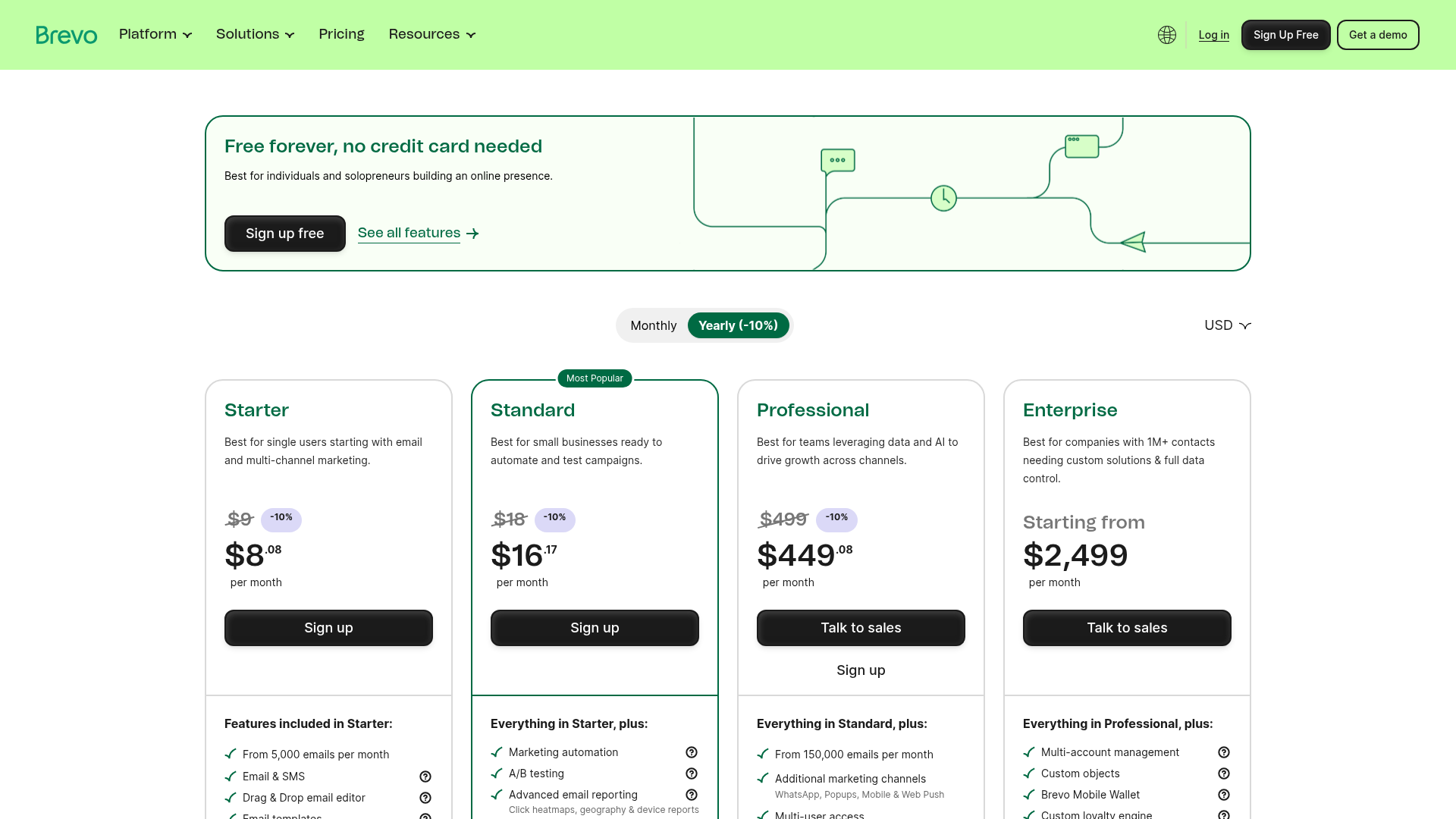
| Plan | Monthly billing | Yearly billing | What sets it apart |
|---|---|---|---|
| Free | $0 | $0 | Up to 300 emails a day, single user, automation for up to 2,000 contacts, email support, Brevo logo on emails |
| Starter | $9/mo | $8.08/mo ($97/year) | From 5,000 emails a month, single user, basic reporting, logo removal is a paid add-on |
| Standard | $18/mo | $16.17/mo ($194/year) | Unlimited automation, A/B testing, advanced email reports, 1 landing page, no Brevo logo, up to 3 users with the seat add-on |
| Professional | $499/mo | $449.08/mo | From 150,000 emails a month, 10 users included, WhatsApp, popups and push, 10 landing pages, phone support |
| Enterprise | Custom | From $2,499/mo | Multi-account management, dedicated IP, SSO and SAML, custom loyalty and data integrations, customer success manager |
Prices checked on 12 October 2026 on Brevo’s US pricing page. Brevo also prices in euros, pounds, rupees and 13 other currencies, so the number you see depends on your region.
Brevo add-ons that change the price
| Add-on | Price |
|---|---|
| Remove Brevo logo (Starter) | $12/mo, or $10.80/mo billed yearly |
| Extra user seat (up to 10) | $12/mo per seat |
| Starter: up to 10,000 emails a month | +$8/mo on top of the plan |
| Standard: up to 10,000 emails a month | +$17/mo on top of the plan |
| Sales Essentials CRM package | $31/mo per seat, or $27.92/mo billed yearly |
| Extra landing pages (Standard) | 2 to 6 pages for +$24/mo |
| SMS and WhatsApp | Credits bought separately, priced by country and volume |
How to Claim Brevo Coupons and Discounts in 5 Steps
- Open the Brevo pricing page and switch the toggle to Yearly (-10%). The discount is applied to the shown price, so there’s nothing to type in.
- Click Sign up free and create an account with your email address and organization name. No credit card is needed for the free plan.
- Wait for Brevo to approve your account for sending. Until you upgrade, you can send up to 300 emails a day.
- Upgrade from your account: choose Starter, Standard or Professional, set your monthly email volume, keep yearly billing selected, and pay by card or PayPal.
- If you run a registered nonprofit, contact Brevo support with proof of status before upgrading, wait for your coupon code, and apply it in the app to get 20% off.
Not sure about yearly? Brevo lets you choose monthly or yearly when you sign up, and the monthly subscription period is 30 days, so start monthly and switch once you know your sending volume.
What You Get With Brevo in 2026
Brevo started as Sendinblue, an email newsletter tool, and has grown into a full marketing and CRM platform. Here’s what matters before you spend money on it:
- Email, SMS and WhatsApp in one place: every paid plan sends email and SMS campaigns, and Professional adds WhatsApp, popups, and web and mobile push.
- Transactional email on all plans: order confirmations and password resets go out through Brevo’s API or SMTP relay, even on the free plan.
- Marketing automation: multi-step workflows triggered by purchases, page visits or email clicks. Free and Starter cap automation at 2,000 contacts; Standard and above are unlimited.
- AI tools: the AI content generator drafts subject lines and email copy, and Brevo now offers an MCP connection so you can manage campaigns and contacts from ChatGPT or Claude.
- Built-in CRM: the Sales Essentials package adds custom pipelines, sales automation and chat if you want marketing and sales in one tool.
- 150+ integrations: including Shopify, WordPress, Stripe and Zapier.
In my view, Brevo’s biggest advantage is its pricing model. Because you pay for emails sent rather than contacts stored, a business with a large list that emails once or twice a month pays far less than it would on contact-based tools. If you email a small list every day, compare the cost carefully, since volume is what drives your bill.
Ways to Pay Less for Brevo
- Pay yearly: 10% off Starter, Standard and Professional, which takes Standard from $18 to $16.17 a month.
- Skip the logo add-on: removing the Brevo logo on Starter costs $10.80 a month billed yearly, which brings it to $18.88, more than Standard at $16.17, where the logo is already gone.
- Size your email volume honestly: plans are priced by monthly sends, so pick the lowest tier that covers your real sending and upgrade later.
- Use the free plan for testing: 300 emails a day is enough to set up templates, forms and automations before you pay.
- Ask about nonprofit pricing: registered nonprofits get 20% off any monthly or yearly plan.
- Check the Startups program: Brevo partners with startup programs and VCs to offer discounts to their members, so ask your accelerator if it has a deal.
Weighing Brevo against other tools? Our list of the best Mailchimp alternatives includes Brevo alongside other low-cost email platforms, and our Omnisend review covers a strong option for ecommerce stores that want email and SMS together. If you also need a CRM, see our roundup of HubSpot alternatives.
Brevo Coupon and Discount FAQs
Brevo doesn't publish a public promo code for everyone. On 12 October 2026 the real savings were 10% off yearly billing on Starter, Standard and Professional, plus a 20% coupon code that Brevo support sends to verified nonprofits.
At the entry tier, Starter costs $9 a month or $8.08 billed yearly, Standard costs $18 or $16.17, Professional costs $499 or $449.08, and Enterprise starts at $2,499. Prices go up as you add email volume, seats and extras.
No. You only need an email address and your organization name. Once Brevo approves your account for sending, the free plan lets you send up to 300 emails a day.
Yes. Sendinblue renamed itself Brevo in 2023, and old sendinblue.com links now redirect to brevo.com.
Yes. You can cancel a Brevo plan from your account at any time. Brevo keeps your data in case you come back, or deletes it on request.
Send Brevo support proof of nonprofit status, such as a registration certificate, tax ID or official website. Once approved, you get a coupon code for 20% off any monthly or yearly paid plan.
Final Word on Brevo Coupons and Discounts
Skip any site promising a secret Brevo code; Brevo’s own site doesn’t list one. The real Brevo coupons and discounts are simple: 10% off when you pay yearly, 20% off for registered nonprofits, and a free plan that sends 300 emails a day. For most small businesses, Standard at $16.17 a month billed yearly is the best value, since it includes unlimited automation and drops the Brevo logo. Start free, test your templates, and upgrade once you know how many emails you really send.
